Observer Setup
Warning!
Just because you are in the "Observer" section, does not mean you are an observer. This is for the POV and freecam observers.
POV Observer Setup (Recommended)
To adjust recommended POV camera settings, open:
Settings -> Viewing -> General
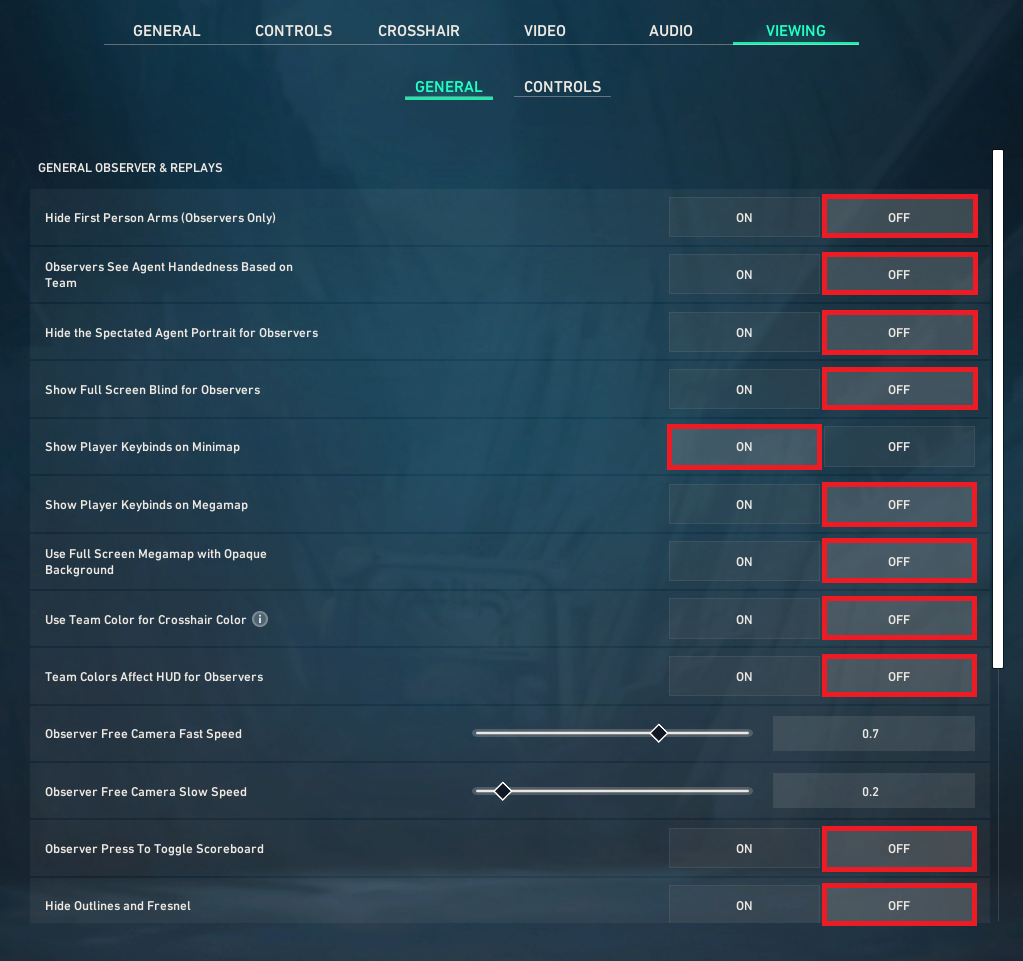 *Specific setting info below
Freecam Observer Setup (Recommended)
Camera Sensitivity
Adjust pan and acceleration speed to low settings for smoother camera shots.

2. Controller Support (XY Controller)
Connecting an analog controller provides smoother movement vectors than a keyboard.
DS4Windows Setup:
- Download and run DS4Windows
- Connect your controller via USB or Bluetooth.
- Ensure your controller maps correctly in the DS4Windows Controllers tab.
Viewer Setting Descriptions
Setting | ON | OFF |
|---|---|---|
Hide First Person Arms (Observer Only) | Observers won't see the player's arms/weapon model in first-person view | Observers see the player's arms/weapon as normal |
Observers See Agent Handedness Based on Team | Weapon hand switches depending on which team the agent is on | Weapon hand stays the same regardless of team |
Hide the Spectated Agent Portrait for Observers | The little portrait/icon of the agent being watched is hidden | The agent's portrait shows on screen |
Show Full Screen Blind for Observers | Screen flashes/whites out fully when the spectated player gets flashed | Screen doesn't fully white out from flashes |
Show Player Keybinds on Minimap | Player's keybinds (abilities etc.) are shown next to the minimap | Keybinds are hidden from the minimap |
Show Player Keybinds on Megamap | Keybinds show on the full/expanded map view | Keybinds are hidden on the megamap |
Use Full Screen Megamap with Opaque Background | Megamap takes over the whole screen with a solid (non-see-through) background | Megamap is smaller or has a transparent background |
Use Team Color for Crosshair Color | Crosshair color changes to match each team's color | Crosshair stays a fixed color no matter the team |
Team Colors Affect HUD for Observers | HUD elements are tinted with each team's color | HUD stays neutral/default colored |
Observer Press to Toggle Scoreboard | Scoreboard only shows when a button is pressed | Scoreboard behaves differently (e.g. shown by default or on hold) |
Hide Outlines and Fresnel | Player outlines and glowing edge effects are hidden | Outlines and glow effects are visible |