



























LIVE GAME
This Is Your Most Important Tab
Method 1: Quick Setup (Best for small tournaments)
- Open Live Games Tab
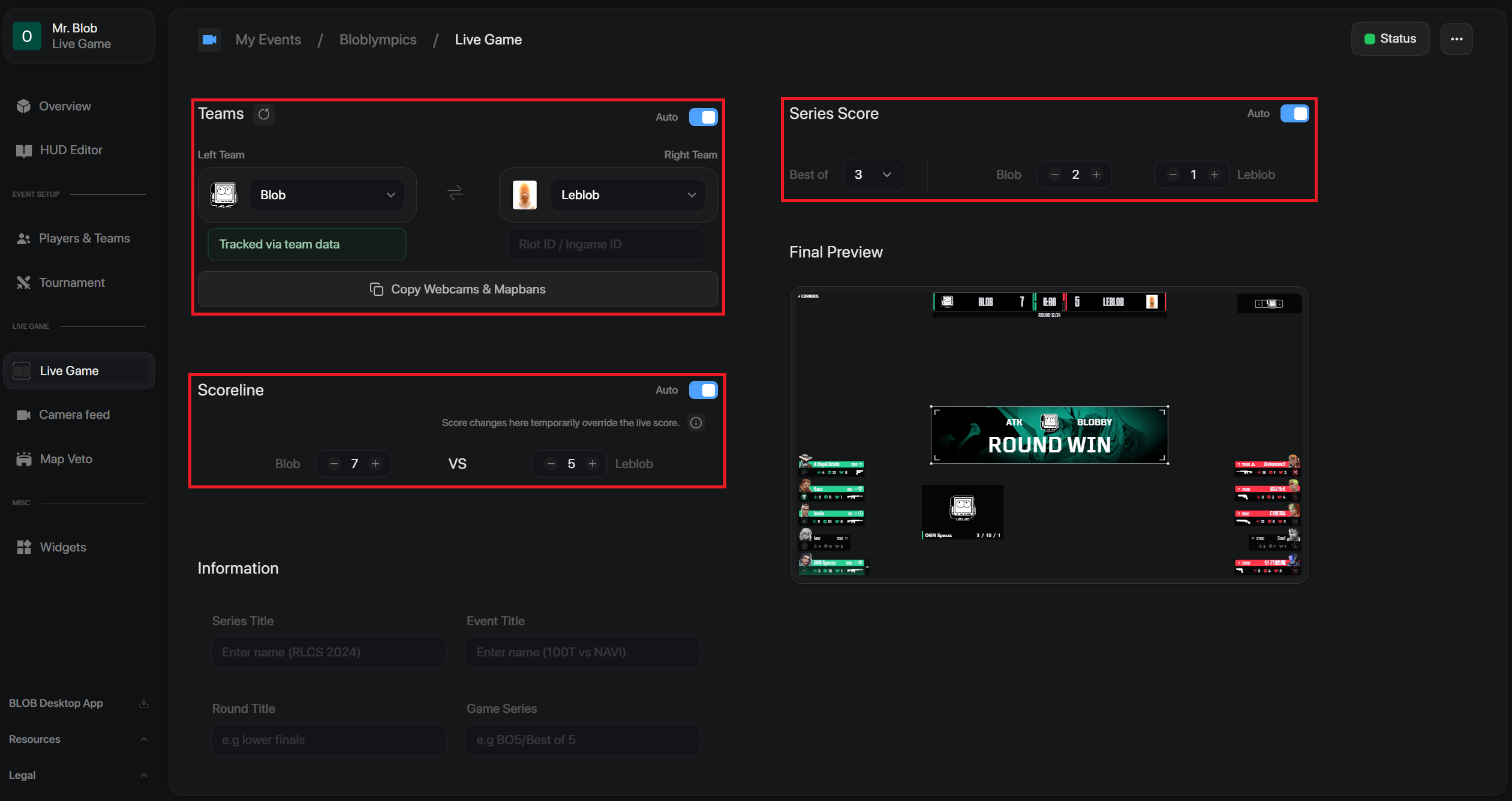
- Manually enter both team names under the Teams section.
- Choose a logo for each team.
- Type in 1 Riot Game ID for a player on each team. (This tells the system which team is on which side of the match.)
Method 2: Efficient Setup (Best for large tournaments & webcams)
- Go to the Players & Teams tab first and set up all participating teams with their names, logos, and full player rosters (For webcam → including all Riot Game IDs).
- Head back to Live Game tab, pick both competing teams directly from the drop-down menus.
- Click Copy Webcams & Map bans to copy all URLs conveniently.
Score & Series Configuration
- Choose your match format (Best of 1, 3, 5) under Series Score.
- Leave both Series Score and Scoreline set to Auto so scores update automatically round-by-round.
- If a crash or disconnection happens, manually adjust the score on the current round. Auto-tracking will resume on the next round.